As you know, this blog is about law and technology. I do my best to keep the subjects I write about within those parameters. However, some issues are so important, so vital to the well-being of our society, I feel compelled to share them here, even though they may not have anything to do with the comparatively mundane topic of legal technology. I also feel compelled to do what little I can to amplify the voices of those who speak out or write about such important, vital issues.
One such issue is the vile reality of police misconduct and abuse and the response to it by the Black Lives Matter Movement. Make no mistake, BLM is the most consequential movement in the U.S. since the Civil Rights Movement of the 1960s. May it continue to highlight the racial injustice that infects our society, and may we all do what we can to rebuild a better, more just, more equal, “more perfect union.”
One such person has recently written on a legal topic that goes hand-in-hand with police misconduct and abuse. It is an topic that has not often been mentioned much by the media (though that is changing), which is astonishing given the key role it plays in legalizing police violence against our neighbors who happen to be of a different race or ethnicity than us whites. That issue is the judge-made doctrine called “qualified immunity.” The person who has recently wrote about it is Judge Carlton W. Reeves.
Judge Reeves was appointed to the Southern District Court of Mississippi by President Obama. On August 4, 2020, Judge Reeves issued an opinion in the matter of Jamison v. McClendon about qualified immunity that is, without a doubt, one of the most moving pieces of legal writing I have ever read. Detailing the long, tragic, gut-wrenching history of how African-Americans, in particular, have been treated by law enforcement reduced me to tears. After I read the opinion, I felt anger at our judicial system and the judges who created this fictional “escape hatch” that allows murderers with a badge to escape any legal consequences for the horrors they have wrought. I felt shame at myself for the many privileges I unconsciously enjoy every day solely because I happen to be white.
I understand that statement offends some white people, threatens them to their very core, but it remains true nonetheless. As things are, I do not have to worry that I might be shot dead in my own bed like Breonna Taylor. I do not have to fear that a child of mine might have his or her life taken away in an instant simply because he or she was playing with a toy gun in a public park like 12-year-old Tamir Rice. I never think that I might be murdered while helping an autistic person who had wandered away from a group home like Charles Kinsey. If I have a broken tail light on my car, and an officer sees me, I do not fear that I might be shot to death like Walter Scott. For that, I am lucky, and because of that, I am ashamed.
It is difficult to read the opinion because it is so heartbreaking, but the time has come for all of us to feel the heartbreak the African-American community has felt for centuries. The day of reckoning is here. Everyone should read Judge Reeves’ opinion in Jamison v. McClendon. I only hope his moving words help end the travesty of qualified immunity so that equal justice can finally have its way.
I include Judge Reeves’ opinion here for those who care. Thanks for reading.
Because of the coronavirus pandemic, technology has never been more important to the practice of law. As a result of shelter-in-place orders issued throughout the country, law firm owners and managers, regardless of firm size, have been forced to put aside any reluctance they might have felt about new technology and innovate, virtually overnight, if you pardon the expression. The result has been nothing less than a sea change in the way many firms conduct day-to-day operations.
In Part I of this three-part series, we will examine how remote work has trended in law in recent months and begin our examination with some basic tools needed to ensure that your firm’s remote work arrangements are successful. In Part II of the series, we will move beyond basic tools, drill down to some specific tech apps designed for remote law firm work, and also explore how to set up an effective remote work policy. Finally, in Part III, we will examine some of the legal and ethical pitfalls that come with remote law firm work. To start, let’s focus on some striking statistics.
Numbers Tell the Tale
Even before the pandemic, some forward thinkers in the legal field were questioning the old ways in which law firms were managed. Take office space, for example. In 2015, an article ran in The Atlantic that posed for its title the question: “Do Lawyers Need Offices Anymore?” The article went on to point out the increasing number of firms that allowed employees to work remotely.
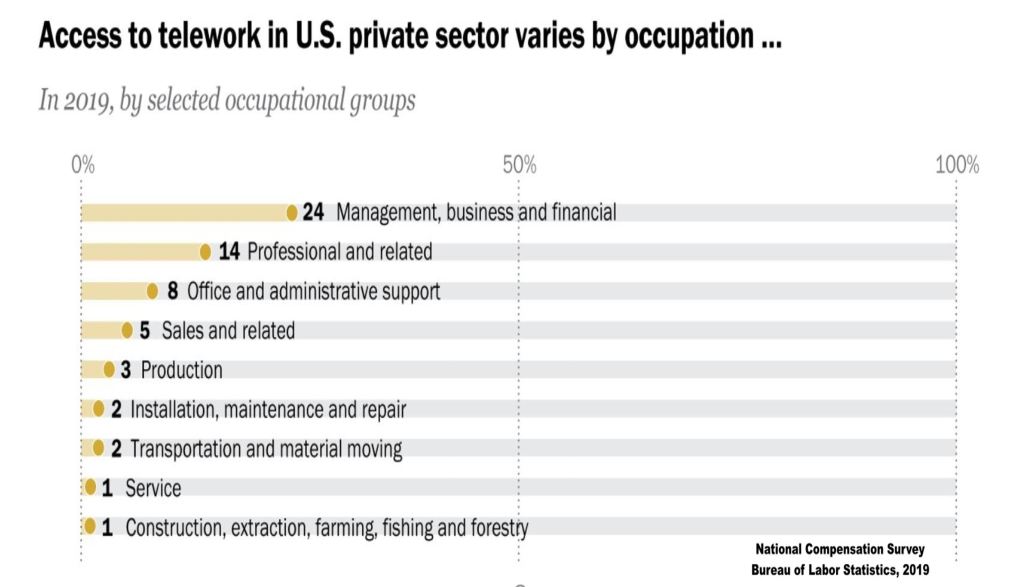
Yet, 2015 was not some turning point. Way back then, law firms still mostly operated according to tried-and-true philosophy, and that philosophy required, for the most part, that employees work at the firm’s location. In fact, this philosophy was not unique to law firms, and it would remain firmly entrenched in the years following The Atlantic article across professions. In 2019, the Bureau of Labor Statistics released its National Compensation Survey, an annual report, which found that in professional and related occupations, the sector that included law firms, only 14% of employees engaged in “telework,” what we refer to as remote work today.
Moreover, in 2019, remote work looked quite different than it does today. Remote work once meant that an employee could work from any number of possible locations – the home, a coffee shop, or even the beach were all within the realm of potential spots.
With the pandemic, and related orders closing down businesses to halt the spread of coronavirus, all of this changed rapidly. What is most surprising, however, is how so many law firms stepped up to the plate and adapted, whether the necessarily wanted to or not. According to a study conducted by the law practice management company, MyCase, 87% of law firm employees now work remotely, either all of the time or part of the time.
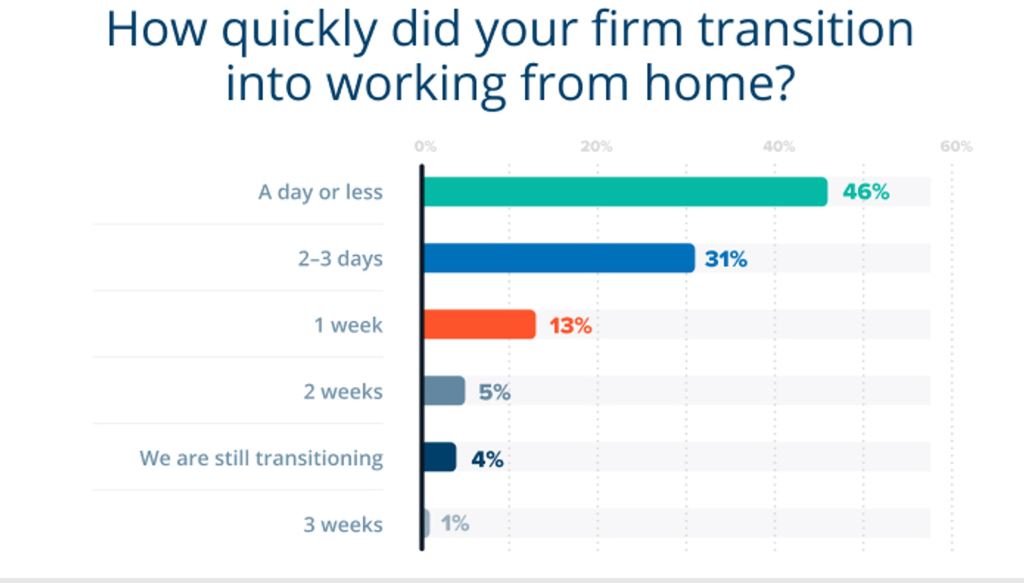
Furthermore, of the over 800 firms MyCase surveyed, 90% reported they made the shift to remote work in 1 week or less. For a profession that has traditionally resisted technological change, these numbers are astounding.
Of course, this is not to say the transition has been easy or even welcomed. Quite the contrary. As a small firm owner, it is easy to write that the transition has, at times, been uncomfortable and disruptive. However, one can often get too comfortable with “business as usual” approaches, and disruption is not always a bad thing. Sometimes, industries that have become stodgy need a little disruption to spur innovation and a motivation to try new ways of accomplishing goals.
It goes without saying, however, that in order to succeed with such an effort, one must add new tools to the toolkit. Law firms who have made or are making the transition to remote work are no exception. What are some of the tools needed for law firms to implement successful remote legal work for their teams? Let’s start with a few basics.
Case Management in the Cloud
First, law firms that want to succeed with remote work arrangements must first embrace “the cloud.” Without the traditional, centralized office arrangement, law firm workers must have a virtual tool that mimics the office. In other words, no access to the cloud; no remote work.
One of the first investments a law firm should make if it wants to achieve remote work success is cloud-based practice or case management software. Gone are the days when a firm’s case management software could be downloaded to workstations or an in-office server and still meet the team’s demands. Practice or case management software must operate in the cloud in order to serve remote workers.
Fortunately, there are many, excellent options to choose from on the market. Rather than risk the appearance of endorsing any of these providers, this law firm owner directs readers to a great website where you can research and compare practice or case management software (or any kind of software, for that matter) yourself: Capterra.com.
In addition to implementing cloud-based case management, firms working remotely should also migrate their document/file management, timekeeping, and accounting systems to cloud-based providers. For document/file management, a firm may not need a provider that is necessarily built for law offices (e.g., Box, Dropbox, or Google Drive), but there are certain benefits of implementing software that has been created with law firms in mind. Moreover, some cloud-based case management tools include additional services like timekeeping and accounting as features, or you may use a stand-alone system. Regardless, all such systems should run fully in the cloud.
Mobility is a Must
Second, employing team members at disparate locations requires secure mobile devices. When it comes to remote work arrangements, security can present thorny challenges. Many law firms, for example, operate under a “BYOD” (Bring Your Own Device) policy, expecting employees to use their own personal smartphones, laptops, or tablet devices for firm work. This might be acceptable so long as these personal devices were being used simply for texting among team members or answering an urgent phone call from a managing partner. However, when it comes to relying on personal devices as potential repositories for client data or other confidential information, firm managers must keep in mind that an employee’s personal device may not utilize the same level of security the firm’s office computers do. For example, an employee’s laptop may not have an adequate firewall or a way to communicate privately over the Internet. An employee’s personal smartphone, for example, may not even have anti-virus protection at all. The employee may not have an up-to-date device with updated software, or the device may have apps running on it that are not secure. These circumstances risk exposing or losing control of sensitive client data, which in turn implicates the firm’s duty of confidentiality as well as safeguarding client information. We will discuss legal and ethical considerations more in Part III of this series.
To meet this challenge, firms should implement written policies that address security issues involved with remote work, particularly employees’ use of mobile devices. Remote work policies will be discussed in greater detail in Part II of this series. Firms may even want to consider acquiring devices for employees to use rather than expecting employees to BYOD.
Communication & Collaboration
The third basic tool required for successful remote work is a communication and collaboration platform that can be shared by all team members, regardless of where they are located or what kind of device they are using. This goes beyond merely having an email provider, although that is essential as well. An effective shared communication tool allows, or at least works alongside, multiple ways of sharing information, such as by texts, telephone calls, emails, chats, or video conferences.
As with other areas of technology, there are excellent providers to choose from, including Microsoft Teams, Google Meet, Zoom, and Slack. It is crucial to choose a platform that is easy not only for team members to use, but also one that clients feel comfortable using because working remotely means fewer or even no in-person client meetings.
Going Beyond the Basics
In our next installment, we will move beyond the basic tools needed to get stuff done and examine some remote work tools for specific law firm or client needs, including calendaring, timekeeping, document signing and sharing, virtual office systems, and more.
In the meantime, tell us about your experiences with remote law firm work. Are you an employee or owner/manager at a law firm? How big is the firm? Have you made the transition to remote work, and if so, are all employees working remotely all of the time, or are some employees working in the office at least part of the time? Are you a law firm owner or manager considering making the leap to remote work? If so, what is motivating your thinking on this topic? What impediments have you encountered?
We would love to hear from you in the comments, and we hope you enjoyed Part I of this series.
On August 13, 2020, the Fourth Appellate District of the California Courts of Appeal held that, under certain factual circumstances, Amazon.com, LLC (“Amazon”), “‘the world’s largest store’ in the Internet age,” can be held strictly liable under California law for injuries caused by dangerous products consumers acquire through the tech giant’s website.
In Bolger v. Amazon.com, LLC, the plaintiff purchased a replacement laptop battery that was offered for sale by Amazon on its website. However, the battery was listed on Amazon’s website as “sold by” Lenoge Technology (HK) Ltd. (“Lenoge”). Lenoge operated on Amazon under the name “E-Life.” The plaintiff used the laptop battery for approximately one month when it suddenly exploded causing her to suffer severe burns that required extensive hospitalization.
The plaintiff sued Amazon and several other defendants, including Lenoge. Lenoge and another defendant, Herocell, Inc., were eventually served with process, but neither company answered so the plaintiff took their defaults. A third defendant, Shenzhen Uni-Sun Electronics Co., is a Chinese company that was never served due to obstacles involved in service of process in China. This situation left plaintiff without a sufficient remedy for her injuries; that is, of course, unless Amazon could be held responsible.
Plaintiff pursued Amazon on theories of strict products liability, breach of warranty, and negligence. The trial court granted Amazon’s motion for summary judgment as to all claims and dismissed the case against Amazon. On appeal, the Fourth District reversed the summary judgment, in part, holding that Amazon could be held strictly liable in tort for the plaintiff’s injuries.
In reaching its conclusion, the Court did a deep dive into the inner workings of Amazon. Even if the decision was not so obviously significant, this detailed, judicial exploration of how Amazon works is, in itself, a fascinating read for anyone interested in law or technology, particularly e-commerce. The Court began its analysis by recognizing Amazon’s “two general categories” of products sales:
In one category are the products Amazon itself selects, buys from manufacturers or distributors, and sells to consumers at a price established by Amazon. These products, which make up approximately 40 percent of the website’s sales, are not at issue in this appeal. In the second category are the products ostensibly sold by third parties through Amazon’s website. These “third-party sellers” select their own products, source them from manufacturers or distributors, set the purchase price, and use Amazon’s website to reach consumers. They pay either a monthly fee or a per item fee for the opportunity to sell on Amazon’s website.
The Court then noted that the two product categories are often similar: “The main distinction is that products not sold directly by Amazon include the words ‘Sold by’ and the name of the third -party seller instead of Amazon.” In this case, the laptop battery was offered for sale as “Sold by” E-Life, not Amazon. Thus, as far as Amazon was concerned, it did not meet the dictionary definition of a “seller” or any other label that might trigger strict products liability under California law. Instead, Amazon argued it was merely a service provider.
Acknowledging the broad scope of California’s strict products liability jurisprudence, the Court sharply disagreed with Amazon. Seeming to adopt an approach that this dispute was nothing more than “new wine in an old bottle,” the Court relied on a pair of 1960s-era, strict products liability cases, which the Court found “analogous” to the transaction at issue: Canifax v. Hercules Powder Co. (1965) 237 Cal.App.2d 44 and Barth v. B.F. Goodrich Tire Co. (1968) 265 Cal.App.2d 228. In Canifax, the plaintiff was injured when a defective fuse provided to the plaintiff by an intermediary between the plaintiff and the seller caused dynamite to explode during excavation of an underground tunnel. In Barth, a woman was killed and her passengers injured when the station wagon the woman was driving crashed, allegedly as a result of defective tire provided to the decedent from a wholesale distributor.
According to the Court, the facts of Bolger were like the facts in Canifax because:
Amazon acted as an intermediary between Lenoge/E-Life and the plaintiff;
Amazon accepted the order for the laptop battery;
Amazon billed the plaintiff; and
Amazon remitted the proceeds of the sale to Lenoge/E-Life.
Similarly, the Court found this case analogous to Barth:
Amazon was a link in the chain of product distribution, even if it was not a seller as that term is commonly understood;
Amazon retrieved the laptop battery from its own warehouse; and
Amazon supplied the laptop battery to the consumer.
However, the Court noted that Amazon went even further than the defendants in both Canifax and Barth. Amazon went further than the defendant in Canifax because it took possession of the laptop battery that injured the plaintiff. Amazon went further than the defendant in Barth because it compelled the plaintiff to deal only with it and not the actual seller, to place the order for the laptop battery, and to pay the purchase price for the item.
And, as the Court pointed out, Amazon’s involvement in the transaction did not end there:
Amazon created the website that allowed Lenoge to offer the laptop battery for sale;
Amazon attracted customers through its own activities, including through offers and the Amazon Prime membership program in which the plaintiff participated;
Amazon set the terms of Lenoge/E-Life’s involvement in the transaction;
Amazon was paid a fee for Lenoge/E-Life’s participation;
Amazon required Lenoge/E-Life to indemnify it and name Amazon as an additional insured;
Amazon accepted possession of Lenoge/E-Life’s laptop battery through the “Fulfilled by Amazon” (FBA) Program;
Amazon registered the laptop battery in its inventory system;
Amazon stored the laptop battery in its warehouse;
Amazon created the format for Lenoge/E-Life’s offer to sell the laptop battery and allowed Lenoge to use the fictitious and inconspicuous name “E-Life”;
The plaintiff paid Amazon for the laptop battery;
Amazon personnel retrieved the laptop batter from its place in an Amazon warehouse;
Amazon shipped the laptop battery to the plaintiff in Amazon packaging;
Lenoge/E-Life was not involved in the transaction at all and may not have even known the transaction with the plaintiff even occurred;
Amazon chooses when to pay vendors such as Lenoge/E-Life;
Amazon restricted Lenoge/E-Life’s access to the plaintiff’s customer information;
Amazon took a fee of approximately 40 percent of the transaction;
If the plaintiff had wanted to return the laptop battery, she would have shipped it back to Amazon; and
Amazon personnel inspect returns to determine if they can be resold or not.
From these facts, the Court concluded:
Amazon is an ‘integral part of the overall producing and marketplace enterprise that should bear the cost of injuries resulting from defective products.’ Amazon was ‘involved in the vertical distribution of consumer goods’ and ‘responsible for passing the product down the line to the consumer.’ It was one of the entities ‘responsible for placing the defective product into the stream of commerce.’
(Internal citations omitted.)
The Court went on to explain that the policies underlying California’s doctrine of strict products liability encouraged application of the doctrine to Amazon for three, primary reasons:
Amazon may realistically be the only entity available to compensate a customer injured by a defective product;
Amazon played a substantial role in ensuring that the laptop battery was supposedly safe through its monitoring, tracking, logging, and enforcement of customer complaints; and
Amazon has the capacity to absorb the costs of liability through its ongoing relationship with its vendors.
The Court then made short shrift of Amazon’s rather feeble arguments. Amazon argued that it did not meet the dictionary definition of either “seller” or “distributor,” but the Court rejected this argument, saying that dictionary definitions of words do not define the countours of California’s strict products liability law. Amazon could not cite a single California precedent that supported application of dictionary definitions in circumstances of strict products liability.
Amazon next argued that it lacked control over the laptop battery and referred to a case that the Court found did not apply to the instant case. Aside from this mistaken reliance on inapplicable precedent, the Court determined that Amazon’s argument substantively lacked merit because it did exert control over the product at issue.
Finally, Amazon argued that it did not choose to offer the laptop battery for sale. While the Court acknowledged that no Amazon employee chose the Lenoge/E-Life laptop battery for sale to the exclusion of other laptop batteries, that fact did not change the reality that Amazon was part of the chain of distribution that connected the laptop batter with the plaintiff. Moreover, the Court rejected the notion that Amazon was some “mere bystander” in the transaction. Instead, the Court explained that Amazon designed and controlled a “vast digital and physical apparatus” that facilitated the transaction.
The Court found additional arguments advanced by Amazon – namely, that it operated more like an auctioneer or financier – wholly unpersuasive. Similarly, the Court flatly rejected Amazon’s contention that the Legislature – not the courts – were the appropriate forum to determine whether Amazon could be held strictly liable, reminding the company that in California strict products liability is a judge-made, common law doctrine. Amazon could cite to no precedent that suggested otherwise.
Finally, Amazon pushed a version of the logically flawed “floodgate” argument, arguing that if it were held strictly liable in tort other “websites for products sold by others” would necessarily be liable. The Court was unimpressed and careful to note that the issue in this case was not whether other types of transactions using Amazon would qualify for strict liability treatment. Indeed, the Court expressed no opinion about any transactions other than the transaction involving the laptop battery the plaintiff purchased.
All in all, August 13 was not a good day for Amazon. The Bolger opinion landed a direct hit on a core part of Amazon’s business model. This may make it difficult for the company to adjust its operations to circumvent the decision while still maintaining its business model, so it seems likely Amazon will at least attempt to get a hearing before the California Supreme Court.
Meanwhile, courts in Pennsylvania and Texas stand poised to render decisions about whether Amazon can be held strictly liable under the laws of those jurisdictions. What, if any, effect will the Bolger decision have on these other cases? Historically, California has been the vanguard for the development of strict products liability law. Will California’s role as a thought leader in this area continue? Only time will tell.
What do you think about this decision? Was it correctly decided or not? What implications does it have for other e-commerce providers, such as Etsy, Redbubble, Shutterstock and many others? Is it limited just to the facts of this particular case, or does it have wider application? Your comments on this most important decision are appreciated.
A copy of the Bolger opinion is also provided below or you can obtain it at Justia.com at this link.
As the BBC succinctly put it, “An image of a man holding ecstasy tablets in his palm was found on the mobile of someone arrested in Bridgend.” Bridgend is a city in Wales in the UK. That “someone arrested” was 22-year-old Aaron McKay.
So began a first-of-its-kind investigation that would ultimately lead to 11 convictions, including that of a so-called drug “kingpin.” All of these individuals were either offering the drugs for sale or locating them for purchase, using the popular messaging app owned by Facebook.
What makes this case interesting is that police did not even need the “kingpin’s” cell phone to bring an entire drug ring down. Authorities got all they needed when they arrested McKay and took possession of his cell phone. On it, they found the image in question, which is shown above.
Facing a daunting task considering that most of the hand is covered by plastic, the police used a combination of photo enhancement and advanced fingerprint technology to match the uncovered part of the hands to the fingerprints of the “kingpin,” 28-year-old, Elliott Morris. An evidently enterprising young man, Morris had taken over the local ecstasy business from his parents, Darren and Dominique, who hands-down win the “parents-of-the-year” award. Morris and his parents are shown below.
The moral of this story is that, if you are a criminal, do not take selfies with your cell phone. If you are a criminal, taking selfies – of any part of your body – is one of the stupidest things you can do, especially when the photo reveals criminal activity or the fruits of a crime.
If you do not believe this story, check out all these other examples of selfies that got the photographers caught red-handed or shortly after the crime was committed. If that article does not convince you, maybe you heard about the Chicago man that brutally murdered his own father and then posted a selfie with dad’s battered head on Facebook. Still not persuaded? Well then, there were the Ohio bank robbers who posted numerous selfies on Facebook displaying the cash they had stolen. Below, we see one of those robbers pretending to eat the ill-gotten cash like a delicious ham sandwich. Now that’s brilliance personified.
To put it in simpler terms, an idiot with a cell phone is usually not a good thing – unless you’re a cop. If you’re a copy, an idiot with a cell phone – whether it’s yours or someone else’s – is evidence.
You have just hung out your shingle, but you do not know what amount to charge clients for your hourly rate. What do you do? There is a lot of advice out there. One solution might be to ask around and find out what the market rate is for legal services in your area, with your level of expertise. That makes sense to a certain extent, but from a marketing standpoint, does it make even more sense to charge a discount from the market rate in your area as a means to attract new business? If so, how much of discount can you offer? Do you simply pick a number at random?
Questions such as these vex new and seasoned attorneys alike. Today, I found a handy online calculator over at Lawyerist.com, which offers a methodology for figuring out what hourly rate to charge clients. The calculator asks you how much you would like to earn in after-tax income as well as how many hours you want to spend working. It also takes into account monthly office expenses. It then calculates an hourly rate. Nice, right?
If you are a new attorney or one with experience, and are uncertain how much you should be charging as an hourly rate, you might want to play around with this online calculator. It is easy to use and might help shed some light on a persistent problem.
This is precisely the question being raised by the Knight First Amendment Institute at Columbia University on behalf of two Twitter followers blocked by President Trump after they expressed critical or opposing views on the President’s personal Twitter feed, @realDonaldTrump. In essence, these Twitter followers analogize their situation to one where a politician impermissibly blocks an individual from attending a town hall event held at a private location because the individual criticized that politician. Twitter, they assert, is a “public forum” just like the town hall meeting, and as such, the President cannot refuse their entry or participation. In blocking the Twitter followers, they allege the President violated their First Amendment rights to free speech.
In the U.S., the right to free speech is broad, especially as it applies to critiques of public officials. Is it broad enough to prevent the President from blocking an opposing user from his personal Twitter feed? While novel, it is an interesting question, especially in light of how frequently, and I daresay effectively, this President uses Twitter as a means of advancing his own political agenda.
The Knight Institute sent a letter to the President on June 6, 2017, demanding that he unblock the two Twitter followers and anyone else he has blocked. Only time will tell if this demand ripens into an actual lawsuit. If it does, you can be sure we will hear about it @realDonaldTrump.
On September 9, 2014, California’s Governor, Jerry Brown, signed into law a bill aimed at protecting Californians who review products and services online. Unofficially dubbed the “Yelp Bill,” A.B. 2365 prohibits businesses from forcing California consumers into contracts which waive the consumer’s right to review products or services they receive. The law also prohibits businesses from penalizing consumers who write negative reviews.
Fines for violating California’s law can be stiff. A.B. 2365 imposes a fine of $2,500 for the first violation and $5,000 for each subsequent violation. If a violation is found to be willful, intentional or reckless, the fine increases to $10,000.
Online review services such as Yelp celebrated California’s new law. However, many businesses across the country cling to so-called “non-disparagement” clauses in their contracts with consumers. In many instances, these clauses are buried in form contracts set up as “click through” agreements on a business’ website where consumers have no realistic opportunity to negotiate the contract terms.
Examples of cases where businesses have pressed “non-disparagement” clauses on consumers are numerous. You can read more about some of the examples in this article from the Electronic Frontier Foundation.
Following on the heels of California’s “first-in-the-nation” legislation, the U.S. Senate appears poised to debate federal legislation that would extend California-style protections to all U.S. consumers. Introduced in the Senate on September 16, 2015, following an unsuccessful introduction in the House, the Consumer Review Freedom Act of 2015 (CRFA) would prohibit several ways that businesses try to prevent consumers from posting negative online reviews. The CRFA would, in cases where a consumer does not have the ability to negotiate or change the terms of a contract with a business, void:
Clauses in the contracts that restrict a consumer’s ability to post a review of the business;
Clauses that impose fees on consumers who post negative reviews; or
Clauses that attempt to transfer intellectual property rights in a review to the business.
Under the CRFA, businesses would be prohibited from presenting contracts with such clauses to consumers.
The CRFA is not perfect. The Electronic Frontier Foundation has expressed concern about some loopholes and other problems with the bill that should be remedied before it is enacted. Still, the CRFA is a significant step in the right direction for consumer protection.
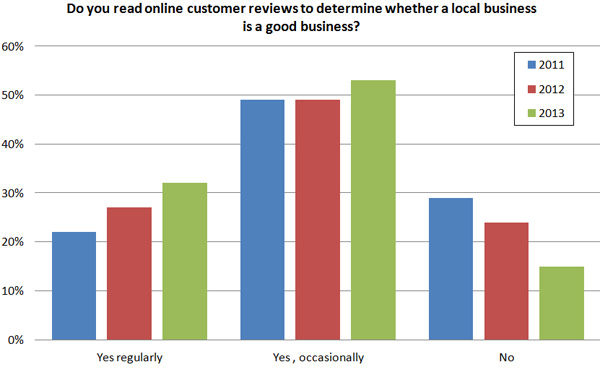
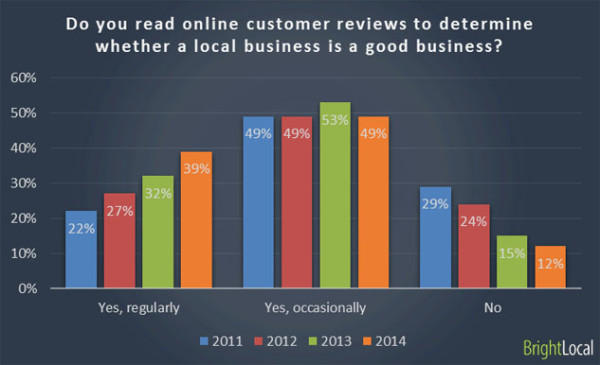
Statistically, the importance of online reviews for businesses cannot be overstated. Recent studies confirm the growing popularity of online reviews with consumers who rely on them when choosing a business with which to work. In 2013, for example, a Local Consumer Review Survey of over 3,500 people in the U.S. and Canada was conducted by BrightLocal, an SEO company. That survey found that 85% of consumers regularly or occasionally read online reviews when selecting a business, up from 76% in 2012.
When the same survey was completed in 2014, 88% of consumers reported that they regularly or occasionally read online reviews when selecting a business. Only 12% of consumers surveyed responded that they did not read online customer reviews to determine whether a business was good or bad.
There is an old saying, “If you don’t have anything good to say, don’t say anything at all.” With legislative reforms like the CRFA on the horizon, and the reality of statistics such as those listed above, businesses that wish to impress that adage on consumers with “non-disparagement” clauses are engaging in nothing more than wishful thinking. Those days are over. Whether they are good or bad, online reviews are here to stay, and smart businesses will take advantage of them by providing excellent products and services to consumers.








 What makes this case interesting is that police did not even need the “kingpin’s” cell phone to bring an entire drug ring down. Authorities got all they needed when they arrested McKay and took possession of his cell phone. On it, they found the image in question, which is shown above.

 You have just hung out your shingle, but you do not know what amount to charge clients for your hourly rate. What do you do? There is a lot of advice out there. One solution might be to ask around and find out what the market rate is for legal services in your area, with your level of expertise. That makes sense to a certain extent, but from a marketing standpoint, does it make even more sense to charge a discount from the market rate in your area as a means to attract new business? If so, how much of discount can you offer? Do you simply pick a number at random?
 This is precisely the question being raised by the

 CyberEsq